Showing posts with label 2. Show all posts
Showing posts with label 2. Show all posts
Samsung Galaxy S3 vs Samsung Galaxy Note 2 Which Should You Get
Samsung galaxy series is surely became the biggest winner of the mobile phone market recently. The most outstanding two representatives- Samsung Galaxy S3 and Samsung Galaxy Note II , arguably one the most popular – and one the most profitable. Before that, Samsung Galaxy S3 and iPhone 5 contradistinction is very hot, now people turn to a new contradistinction. Now that I write this comparative article niche targeting , it is time to start the Samsung Galaxy S3 vs Samsung Galaxy Note 2 specification and the user experience battle. Let’s get it on!

Price:
Samsung Galaxy S3 is now priced at around $600 on Amazon whereas we are expecting the Samsung Galaxy Note 2 price to be around $700!!
Android OS Version :
Galaxy Note 2 has the latest Android 4.1 Jelly Bean out of the box. Even the Samsung Flagship Galaxy S3 would be getting the official Android 4.1 Jelly Bean.
CPU / Processor and RAM :
Samsung Galaxy S3 sports a powerful Samsung made Exynos 4 Quad ( Exynos 4412 ) 32 nm chip which is a A9 Cortex Quad Core processor with each core clocked at 1.4Ghz and the same Exynos 4412 Quad is in Galaxy Note 2, only difference is that it is clocked at 1.6GHz.
Samsung Galaxy S3 has 1GB RAM whereas the Galaxy Note 2 features a 2GB RAM.
Battery :
Galaxy S3 which does certainly lasts long even with moderate to heavy usage.
Now the Galaxy Note 2 has a 3100 mAH powerful battery.It certainly would give huge battery life and it seems that can easily last a day or two.
But yeah comparitively, Note 2 battery wouldnt be much superior to that of the Galaxy S3 because the Note 2 is a bigger device meaning more bigger battery.
Screen Display :
Now these are some big displays in the market and undoubtedly almost the maximum the technology could offer at the moment.The Samsung Galaxy S3 flaunts a 4.8 inch Super AMOLED HD display with a pentile matrix having 306 ppi (pixels per inch).Its having a resolution of 1280 x 720 ( 720p). Now whereas the Galaxy Note 2 is flaunts a gigantic 5.5 inch Super AMOLED HD with the same resolution surprisingly having the Pentile matrix as well.
* These 2 are wonderful smart phones of the year, if one decided to buy any one, they won’t select one from this easily since both are awesome specs. - from Taylor
* I would say, it all depends, S3 is bit more expensive than galaxy note here. But Note gives more control over usage as its big in size. S3 is a proper phone while note is sort of alternate to tablet and laptops. - from Norris
* note 2 specs are little better than the s3 but there is not a major diff between them..if u like the bigger screen go with the note 2.if u like th lighter go with s3!! - from Partridge
Whether the two parts comparison above help you guys decided which of these smartphones you gonna to buy? We are really interested to know your feedback !
By the way, Samsung Galaxy users, if you deleted,formatted, lost, corrupted, erased files from Samsung Galaxy phone by mistake, just following the guide below to get your data back soon:
ReadMore detail...
Part I, Objective Data Comparison
The fight includes five equally important rounds: price, android os version, cpu/processor and ram, battery, screen display.Price:
Samsung Galaxy S3 is now priced at around $600 on Amazon whereas we are expecting the Samsung Galaxy Note 2 price to be around $700!!
Android OS Version :
Galaxy Note 2 has the latest Android 4.1 Jelly Bean out of the box. Even the Samsung Flagship Galaxy S3 would be getting the official Android 4.1 Jelly Bean.
CPU / Processor and RAM :
Samsung Galaxy S3 sports a powerful Samsung made Exynos 4 Quad ( Exynos 4412 ) 32 nm chip which is a A9 Cortex Quad Core processor with each core clocked at 1.4Ghz and the same Exynos 4412 Quad is in Galaxy Note 2, only difference is that it is clocked at 1.6GHz.
Samsung Galaxy S3 has 1GB RAM whereas the Galaxy Note 2 features a 2GB RAM.
Battery :
Galaxy S3 which does certainly lasts long even with moderate to heavy usage.
Now the Galaxy Note 2 has a 3100 mAH powerful battery.It certainly would give huge battery life and it seems that can easily last a day or two.
But yeah comparitively, Note 2 battery wouldnt be much superior to that of the Galaxy S3 because the Note 2 is a bigger device meaning more bigger battery.
Screen Display :
Now these are some big displays in the market and undoubtedly almost the maximum the technology could offer at the moment.The Samsung Galaxy S3 flaunts a 4.8 inch Super AMOLED HD display with a pentile matrix having 306 ppi (pixels per inch).Its having a resolution of 1280 x 720 ( 720p). Now whereas the Galaxy Note 2 is flaunts a gigantic 5.5 inch Super AMOLED HD with the same resolution surprisingly having the Pentile matrix as well.
Part II, The User Experience Contrast
Most of the time, user feedback is also very important, you can more truly to know the two mobile phone performance, include most things that not mentioned in the specification.* These 2 are wonderful smart phones of the year, if one decided to buy any one, they won’t select one from this easily since both are awesome specs. - from Taylor
* I would say, it all depends, S3 is bit more expensive than galaxy note here. But Note gives more control over usage as its big in size. S3 is a proper phone while note is sort of alternate to tablet and laptops. - from Norris
* note 2 specs are little better than the s3 but there is not a major diff between them..if u like the bigger screen go with the note 2.if u like th lighter go with s3!! - from Partridge
Whether the two parts comparison above help you guys decided which of these smartphones you gonna to buy? We are really interested to know your feedback !
By the way, Samsung Galaxy users, if you deleted,formatted, lost, corrupted, erased files from Samsung Galaxy phone by mistake, just following the guide below to get your data back soon:
http://www.any-data-recovery.com/topics/mobile-devices/recover-samsung-galaxy.html

Tips on how to enter recovery mode on Samsung Galaxy Note 2
If you are a Samsung Galaxy Note2 user,keep this Samsung Data Recovery tip,maybe oneday you might need it.
When you need to install official or custom ROMs in your Android devices, or you have a need to wipe the cache, dalvik cache or to have access for other options which help you to customize your Samsung Galaxy Note 2 device, then you should enter in the recovery mode, for make this thing is very easy, only to know the right combination of actual button.

Before teach you how to enter in the recovery mode, you mustassimilateyour consideration that, the recovery mode is an important menu for your device and there, it’s very dangerous if you don’t know what you should to do.
Very generally the recovery mode for Galaxy Note 2 smartphone is used for flash new custom ROM or for backup, there if is installed the CWM (ClockworkMod) installed, then you can easily to install the custom ROMs or to get the backup for your current Rom installed in your device. A complete backup, which is possible from the recovery mode in the Note 2,it is the Nandroid backup; with this tool you can get a full backup for all your data, like the ROM and your personal information, apps, files, documents, contacts. For this kind of backup, you’ll need more than 1 GB free space in your internal device memory. But for installing the CWM you’ll need the root access, and if you’ll root your device the warranty will be void.
These things above mentioned we can begin our tutorial.
How to enter recovery mode on Samsung Galaxy Note 2 smartphone:
* Turn off your Samsung Galaxy Note 2 device.
* After the device is turned off, press the following combination of buttons in the same time:
Volume up + power button + home button, and keep these buttons pressed until the recovery mode will be displayed.
* When you’re in the recovery mode, you can release the buttons.
This is all, now you successfully learnt how to access the recovery mode on Samsung Galaxy Note 2 device.
Another modality to enter in the recovery mode is only for the rooted Galaxy Note devices for some custom’s ROMs, for this method press the power button for a few seconds and then a pop up methods will be displayed. Now, in the menu select the reboot option, there you should see the reboot options: “Normal”, “Recovery”, and “Download “. From there choose the Recovery option and then your device will take a reboot in the recovery mode directly, without any other settings.
Remember to use our comment section for any troublesto understand our tutorial.
Another tip:
Deleted files from Samsung mobile phone by mistake is common to Samsung users, if it happen on you, and you need to recover deleted photos from Samsung galaxy, what should you do? Ha, the answers just in this blog! (Note: turn to "Tutorial: How to Recover Samsung Galaxy" Or "Simple Points To Help You Recover Deleted Pictures From Samsung Galaxy " )
ReadMore detail...
When you need to install official or custom ROMs in your Android devices, or you have a need to wipe the cache, dalvik cache or to have access for other options which help you to customize your Samsung Galaxy Note 2 device, then you should enter in the recovery mode, for make this thing is very easy, only to know the right combination of actual button.

Before teach you how to enter in the recovery mode, you mustassimilateyour consideration that, the recovery mode is an important menu for your device and there, it’s very dangerous if you don’t know what you should to do.
Very generally the recovery mode for Galaxy Note 2 smartphone is used for flash new custom ROM or for backup, there if is installed the CWM (ClockworkMod) installed, then you can easily to install the custom ROMs or to get the backup for your current Rom installed in your device. A complete backup, which is possible from the recovery mode in the Note 2,it is the Nandroid backup; with this tool you can get a full backup for all your data, like the ROM and your personal information, apps, files, documents, contacts. For this kind of backup, you’ll need more than 1 GB free space in your internal device memory. But for installing the CWM you’ll need the root access, and if you’ll root your device the warranty will be void.
These things above mentioned we can begin our tutorial.
How to enter recovery mode on Samsung Galaxy Note 2 smartphone:
* Turn off your Samsung Galaxy Note 2 device.
* After the device is turned off, press the following combination of buttons in the same time:
Volume up + power button + home button, and keep these buttons pressed until the recovery mode will be displayed.
* When you’re in the recovery mode, you can release the buttons.
This is all, now you successfully learnt how to access the recovery mode on Samsung Galaxy Note 2 device.
Another modality to enter in the recovery mode is only for the rooted Galaxy Note devices for some custom’s ROMs, for this method press the power button for a few seconds and then a pop up methods will be displayed. Now, in the menu select the reboot option, there you should see the reboot options: “Normal”, “Recovery”, and “Download “. From there choose the Recovery option and then your device will take a reboot in the recovery mode directly, without any other settings.
Remember to use our comment section for any troublesto understand our tutorial.
Another tip:
Deleted files from Samsung mobile phone by mistake is common to Samsung users, if it happen on you, and you need to recover deleted photos from Samsung galaxy, what should you do? Ha, the answers just in this blog! (Note: turn to "Tutorial: How to Recover Samsung Galaxy" Or "Simple Points To Help You Recover Deleted Pictures From Samsung Galaxy " )
Adobe FlashMedia Encoder 2 5 User Guide for Windows
Before you begin working with Adobe® Flash® Media Encoder, take a few moments to read the following overview of the Help and of the many resources that are available to users. copied only in accordance with the terms of such license. Except as permitted by any such license, no part of this guide may be reproduced, stored in a retrieval system, or transmitted, in any form or by any means, electronic, mechanical, recording, or otherwise, without the prior written permission of Adobe Systems Incorporated. Please note that the content in this guide is protected under copyright law even if it is not distributed with software that includes an end user license agreement. The content of this guide is furnished for informational use only, is subject to change without notice, and should not be construed as a commitment by Adobe Systems Incorporated. Adobe Systems Incorporated assumes no responsibility or liability for any errors or inaccuracies that may appear in the informational content contained in this guide. Please remember that existing artwork or images that you may want to include in your project may be protected under copyright law. The unauthorized incorporation of such material into your new work could be a violation of the rights of the copyright owner. Please be sure to obtain any permission required from the copyright owner. Any references to company names in sample templates are for demonstration purposes only and are not intended to refer to any actual organization. Adobe, the Adobe logo, Media Player, and Flash are either registered trademarks or trademarks of Adobe Systems Incorporated in the United States and/or other countries. Apple and Macintosh are trademarks of Apple Inc., registered in the United States and other countries. Intel ® Corporation is a registered trademark of Intel Corporation in the U.S. and other countries. Microsoft and Windows are either registered trademarks or trademarks of Microsoft Corporation in the United States and/or other countries.
Get from here to download Adobe FlashMedia Encoder 2.5 User Guide for Windows
OllyDBG 2 01 beta 2
OllyDbg is a 32-bit assembler level analysing debugger for Microsoft®Windows®. Emphasis on binary code analysis makes it particularly useful in cases where source is unavailable. OllyDbg is a shareware, but you can download and use it for free. Special highlights are:
I have signifiicantly changed the way OllyDbg and plugins interact with each other. For example, all functions with fixed number of arguments are declared as __cdecl instead of __stdcall. This removes problem with Visual C that always wants to emit something like _Disasm@32 instead of plain _Disasm or Disasm. Otherwise there are only minor changes. Among them, several of OllyBugs are no longer.
Bookmark plugin now works with 4 different compilers: Borland C++ Builder 5.0 (ancient but still my favorite), command-line Borland C++ 5.5 (produces exactly the same DLL), Visual C++ 2005 (Express Edition) and Code::Blocks (in fact, MinGW which is GNU for Windows). There are separate import libraries for each. Plugin source is identical in all cases. I hope that VC library will also work with all otrher Visual versions. Detailed description will be available later - as always.
Help on API is extended but not as far as I expected. Again: If you need some API function or family that is not yet documented, drop me a mail and Ill try to describe it ASAP.

ReadMore detail...
I have signifiicantly changed the way OllyDbg and plugins interact with each other. For example, all functions with fixed number of arguments are declared as __cdecl instead of __stdcall. This removes problem with Visual C that always wants to emit something like _Disasm@32 instead of plain _Disasm or Disasm. Otherwise there are only minor changes. Among them, several of OllyBugs are no longer.
Bookmark plugin now works with 4 different compilers: Borland C++ Builder 5.0 (ancient but still my favorite), command-line Borland C++ 5.5 (produces exactly the same DLL), Visual C++ 2005 (Express Edition) and Code::Blocks (in fact, MinGW which is GNU for Windows). There are separate import libraries for each. Plugin source is identical in all cases. I hope that VC library will also work with all otrher Visual versions. Detailed description will be available later - as always.
Help on API is extended but not as far as I expected. Again: If you need some API function or family that is not yet documented, drop me a mail and Ill try to describe it ASAP.

Other new features in this version:
- Patch manager, similar to 1.10
- Shortcut editor, supports weird things like Ctrl+Win+$ etc. Now you can customize and share your shortcuts. I havent tested it on Win7, please report any found bugs and incompatibilities!
- Instant .udd file loading. In the previous versions Ive postponed analysis, respectivcely reading of the .udd file till the moment when all external links are resolved. But sometimes it took plenty of time, module started execution and was unable to break on the breakpoints placed in the DLL initialization routine
- Automatic search for the SFX entry point, very raw and works only with several packers. Should be significantly more reliable than 1.10. If you tried it on some SFX and OllyDbg was unable to find real entry, please send me, if possible, the link or executable for analysis!
- "Go to" dialog lists of matching names in all modules
- Logging breakpoints can protocol multiple expressions. Here is an example: I ask OllyDbg to protocol the contents of EAX, EBX and 4 memory doublewords starting at address ESP. Expressions must be separated by commas, repeat count has form SIZE*N, N=1..32:
AutoIndex PHP Script 2 2 4
AutoIndex is a PHP script that makes a table that lists the files in a directory, and lets users access the files and subdirectories.It includes searching, icons for each file type, an admin panel, uploads, access logging, file descriptions, and more.
AutoIndex is provided under the terms of the GNU General Public License (GPL).
Copyright © 2002-2007 Justin Hagstrom

Download AutoIndex PHP Script 2.2.4 for php 5 (mirror)
ReadMore detail...
AutoIndex is provided under the terms of the GNU General Public License (GPL).
Copyright © 2002-2007 Justin Hagstrom
Features:
- You dont have to put index.php in every subfolder - it automatically lets you access subdirectories
- Shows different icons for each file type - includes three different icon styles
- Ability to hide/block certain files, folders, or file extensions
- Works on all servers that support PHP 4.1.0 or higher (including PHP 5)
- No databases needed
- Ability to upload files and to have user accounts
- Built-in admin tools (available when logged in with an admin level account)
- Creating and deleting directories
- Uploading, renaming, copying, and deleting files
- Log viewer and visitor statistics
- Searching for specific files/folders
- Access logging and statistics (stores users IP in a text file along with the time and file request)
- Anti-Leech feature
- Bandwidth limiting
- Files/folders can have custom descriptions
- Thumbnails of images can be generated and displayed
- Can keep track of number of downloads for each file
- Nicer looking than servers default output, and the display is customizable
- Version 2.0 uses a template system for easy customization of HTML output
- Available in 35 languages
- XHTML 1.1 and CSS compliant, so it displays correctly in all browsers
- This software is free
Download AutoIndex PHP Script 2.2.4 for php 5 (mirror)
Adobe Photoshop Lightroom 4 2
Adobe Photoshop Lightroom 4 software provides a comprehensive set of digital photography tools, from powerfully simple one-click adjustments to cutting-edge advanced controls. Create images that inspire, inform, and delight.
Bring out all the detail that your camera captures in dark shadows and bright highlights. Now you have more power than ever before to create great images in challenging light.
Photo book creation-
Create beautiful photo books from your images with a variety of easy-to-use templates included in Lightroom. Upload your book for printing with just a few clicks. Receive 20% off from Blurb on your first book created using Lightroom 4 software.
Location-based organization-
Find and group images by location, easily assign locations to images, or plot a photo journey. Automatically display location data from GPS-enabled cameras and camera phones.
Extended video support-
Organize, view, and make adjustments to video clips. Play and trim clips, extract still images from them, or adjust clips with the Quick Develop tool..
Lightroom 4 provides the photographers tool for creating photo albums with enhanced management and many templates that are easy to use. Photo albums can be obtained directly send to Blurb for printing using the new module Book.
In turn, the addition of soft proofing feature in Develop module allows photographers to adjust the color balance of the images in an environment that mimics the conditions of their demonstrations, and make sure that the image after printing or posting on the Internet will look predictable. In addition, users can now send photos directly from Lightroom if your MX record of most e-mail services, including Gmail, Hotmail and Yahoo! Mail.

Now you can effectively eliminate noise in photographs that occurs when shooting at night with the exposed high sensitivity ISO. Noise reduction in Adobe Photoshop Lightroom - thats all you need to create beautiful images. You will be able to remove even the strongest noise.
• Optimized performance
Now even the most processing-quality photos will take significantly less time by optimizing performance.
• Support for video, shot on camera (DSLR)
Lightroom provides convenient tools for working with video taken with a digital SLR camera, making it easy to combine photos and videos.
• Adding a watermark
You can easily add your logo or watermark is highly customizable. You can add text or image watermarks with adjustable size, position and transparency.
• Fast image import
New user-friendly interface of imports will be informed of the location of the photo after a quick save from a memory card or other media.
• Correction horizon
You will be able to level the horizon in your photos, avoiding distorting effects on the image.
• Layouts for printing
Lightroom offers templates for organizing your photos before you print. With the new tool, a print layout, you can quickly create striking designs by simply dragging a few pictures on the page and changing their size.
• Correcting lens defects
The program can automatically eliminate lens defects like geometric distortion, chromatic aberration, and vignetting. Will be improved even photos without visible distortion.
• Share photos
Lightroom allows you to directly upload photos to Facebook, SmugMug and Flickr. All comments and ratings of your galleries are displayed directly in the library Lightroom.
ReadMore detail...
Top features
Highlight and shadow recovery-Bring out all the detail that your camera captures in dark shadows and bright highlights. Now you have more power than ever before to create great images in challenging light.
Photo book creation-
Create beautiful photo books from your images with a variety of easy-to-use templates included in Lightroom. Upload your book for printing with just a few clicks. Receive 20% off from Blurb on your first book created using Lightroom 4 software.
Location-based organization-
Find and group images by location, easily assign locations to images, or plot a photo journey. Automatically display location data from GPS-enabled cameras and camera phones.
Extended video support-
Organize, view, and make adjustments to video clips. Play and trim clips, extract still images from them, or adjust clips with the Quick Develop tool..
Lightroom 4 provides the photographers tool for creating photo albums with enhanced management and many templates that are easy to use. Photo albums can be obtained directly send to Blurb for printing using the new module Book.
In turn, the addition of soft proofing feature in Develop module allows photographers to adjust the color balance of the images in an environment that mimics the conditions of their demonstrations, and make sure that the image after printing or posting on the Internet will look predictable. In addition, users can now send photos directly from Lightroom if your MX record of most e-mail services, including Gmail, Hotmail and Yahoo! Mail.
Capabilities:
• Improved noise reduction mechanismNow you can effectively eliminate noise in photographs that occurs when shooting at night with the exposed high sensitivity ISO. Noise reduction in Adobe Photoshop Lightroom - thats all you need to create beautiful images. You will be able to remove even the strongest noise.
• Optimized performance
Now even the most processing-quality photos will take significantly less time by optimizing performance.
• Support for video, shot on camera (DSLR)
Lightroom provides convenient tools for working with video taken with a digital SLR camera, making it easy to combine photos and videos.
• Adding a watermark
You can easily add your logo or watermark is highly customizable. You can add text or image watermarks with adjustable size, position and transparency.
• Fast image import
New user-friendly interface of imports will be informed of the location of the photo after a quick save from a memory card or other media.
• Correction horizon
You will be able to level the horizon in your photos, avoiding distorting effects on the image.
• Layouts for printing
Lightroom offers templates for organizing your photos before you print. With the new tool, a print layout, you can quickly create striking designs by simply dragging a few pictures on the page and changing their size.
• Correcting lens defects
The program can automatically eliminate lens defects like geometric distortion, chromatic aberration, and vignetting. Will be improved even photos without visible distortion.
• Share photos
Lightroom allows you to directly upload photos to Facebook, SmugMug and Flickr. All comments and ratings of your galleries are displayed directly in the library Lightroom.
Download Adobe Photoshop Lightroom 4.2
dUP 2 26 Final Release diablo2oo2s Universal Patcher
diablo2oo2s Universal Patcher is a patch engine that will allow developers to build a small standalone patcher executable. Developers will even have the possibility to add music (Tracker Modules: xm, mod, it, s3m, mtm, umx, v2m, ahx, sid) to patcher.
Multiple file patcher, programmable patch procedure, offset patcher, search and replace patcher, text patcher, registry patcher, loader generator, compare files (RawOffset and VirtualAddress) with different filesize, attach files to patcher, get filepaths from registry, CRC32/MD5 and filesize checks, patching packed files, compress patcher with your favorite packer, save/load projects, use custom skin in your patcher, multilanguage support.
here sample of patch which created with dUP


Download dUP 2.26 Final Release (mirror)
ReadMore detail...
Multiple file patcher, programmable patch procedure, offset patcher, search and replace patcher, text patcher, registry patcher, loader generator, compare files (RawOffset and VirtualAddress) with different filesize, attach files to patcher, get filepaths from registry, CRC32/MD5 and filesize checks, patching packed files, compress patcher with your favorite packer, save/load projects, use custom skin in your patcher, multilanguage support.
here sample of patch which created with dUP
dUP 2.26 Final Release
- added large file support for search & replace module
- patchercode now is stored in a DLL
- updated BeaEngine.dll (4.1 rev 172)
- fixed: backup files for [attached file] module
- added new filetime plugin
- added new log message plugin
- added new backup switch plugin
- added new find next file plugin
- fixed: patcher with plugins now can be packed
- new option to run patcher after creation
- new query option in [file check] module: check for write access
- show jump destination of [event] module in patchdata list
- fixed crash when open dUP2 project with large filename
- auto backup unsaved projects
- improved save system
- minor fixes
Download dUP 2.26 Final Release (mirror)
Unlock Root v2 4 2
Unlock Root tools,One Click Root, Support all Android 2.2/2.3/3.0/4.0/4.1 devices,Easy to get root access Permissions, E.g. HTC/Samsung/LG/Huawei/Moto.
Everything has become very simple, you only need to connect the phone to your computer (in charge mode and with debugging enabled by USB) and after it is determined to press the button "Root", if you want to unlock your smartphone, or "UnRoot" if you want In contrast, close access to system folders of your device.
Supported OS: WinXP/Vista/WIN7

Download Unlock Root v2.4.2
ReadMore detail...
Everything has become very simple, you only need to connect the phone to your computer (in charge mode and with debugging enabled by USB) and after it is determined to press the button "Root", if you want to unlock your smartphone, or "UnRoot" if you want In contrast, close access to system folders of your device.
How to Root Your Phone/Tablet
- Your device must be in USB Debugging mode. To turn it on, go to Settings > Applications > Development and check the box.
- Connect your device to your PC, Run UnlockRoot.exe,
- Click “Unlock Root”, Enjoy!
v2.4.2 updates
-- Fix Kernel Root bug, support Samsung Galaxy Note/S2/S.Supported OS: WinXP/Vista/WIN7
Download All Android Drivers
SAMSUNG, HTC, MOTOROLA (32 bit, 64 bit), ACER, ASUS, Dell, Foxconn, Fujitsu, Google, Hisense, HUAWEI, LENOVO, LG, MEIZU, KT Tech, COOLPAD, OPPO, Pantech, Pegatron, SHARP, SONY, ZTE, XIAOMIDownload Unlock Root v2.4.2
How To Hard Reset Wave 2 with Lost Password
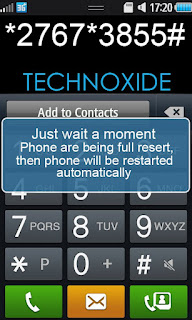
I am tested it with Samsung Wave 2 on Bada 1.2 and Bada 2.0 and its successfully reset to the default one. It may be work with other Bada OS phones.
* Before hard reset your phone must be charged to a minimum of 60%
Steps:
1. Backup your contacts
2. Remove SIM and Memmory Card
3. Now dial *2767*3855# and wait till the phone reboots.
Thats it ! Done ! Now your phone will be in default state !
WSCC Windows System Control Center 2 0 8 0
WSCC is a free, portable program that allows you to install, update, execute and organize the utilities from various system utility suites. WSCC is only an interface, you need to download and install the utilities separately. Alternatively, WSCC can use the http protocol to download and run the programs.
The included Update Manager can check for newer versions of the utilities already installed and can download and install the missing items.
WSCC uses the included WSCC Console to execute command line applications.
WSCC is portable, installation is not required. Extract the content of the downloaded zip archive to any directory on your computer.
WSCC Portable Edition is designed for use on the PortableApps.com Platform.
WSCC U3 Edition is designed for use on the U3 smart drives and integrates itself into the U3 launchpad.

This edition of WSCC supports the following utility suites:
Download WSCC (Windows System Control Center) - Portable
ReadMore detail...
The included Update Manager can check for newer versions of the utilities already installed and can download and install the missing items.
WSCC uses the included WSCC Console to execute command line applications.
WSCC is portable, installation is not required. Extract the content of the downloaded zip archive to any directory on your computer.
WSCC Portable Edition is designed for use on the PortableApps.com Platform.
WSCC U3 Edition is designed for use on the U3 smart drives and integrates itself into the U3 launchpad.
This edition of WSCC supports the following utility suites:
- Windows Sysinternals Suite (including support for Sysinternals Live service)
- NirSoft Utilities
Download WSCC (Windows System Control Center) - Portable
Get Your News On Your iPhone With the 2 Best Free iOS News Readers
 If there is something that has changed radically in the past few years with the advent of new technologies is the way we consume news. News media has migrated from being delivered almost exclusively via TV, radio and newspapers to being consumed by many people via the web.
This tendency has increased dramatically with the boom of smartphones and tablets, doing together to print news what email did to traditional “snail” mail years ago.
However, while nowadays most people get their news via Facebook, Twitter and other similar online social networking services, these are more like “digested” or “summarized” news, which rarely elaborate or provide depth.
If you use news readers though, you know that you can get and consume your news on your iPhone in a way that resembles the more “traditional” methods, providing you with much deeper and better news articles. The problem is that news reader apps tend to be paid apps (at least the good ones used to be), but it wasn’t until recently that some noteworthy, free alternatives became available for the iPhone, iPad and iPod Touch.
Let’s take a look at the two best of them.
What Exactly are News Feeds and Readers?
Despite every news site sporting its own Facebook and Twitter accounts, most, if not all relevant news channels still offer news feeds and RSS channels to which one can easily subscribe to using a service like Google Reader, which gathers all the news from the news’ sources that you like.
Important Information: News feeds and RSS channels are streamlined versions of news created specifically for reader to subscribe using news reader services. If you have a Google account, you already have what you need to start subscribing to some RSS feeds. Head over to Google Reader to learn more.
2 Best News Readers for iOS


Its interface is very simple and intuitive, with users needing only to “flip” through articles to scan across them. That said, it is not the most efficient reader due to its interface, since it doesn’t show as many news as other alternatives on one screen.


Feedly
Our other alternative is Feedly, a more recent contender in the news reader space that offers a more traditional interface, but keeping things still a bit fresh with some original navigations elements. Feedly also syncs with your Google Reader account, making it fairly easy to pull your news from Google’s service to read in the app.

Navigation within the app is ok, although you might need to adjust some settings in order to tailor it to your liking.


Conclusions
In both cases these apps allow you to save articles for later reading either within the apps themselves or through popular read-later services like Instapaper and Pocket (which we compared in this article).
This puts them on par even with paid news readers and makes them very important alternatives for anyone who likes to read news the way their writers intended. Make sure to check out both apps, since they offer very different experiences, which gives you even more to choose from. And best of all? You get all these choices at no cost!
Via Guidingtech
Number Lock v1 2 1 By MMMOOO S 3 Anna Belle UnSigned
MMMOOO Number Lock v1.02(1) S^3 Anna Belle UnSigned


Block more cool and comfortable on your device.
Have you seen the number block in iOS5?
Now can you own! Cool App of MMMOOO, deeply personalized for users of Symbian, clean, elegant and soft, helps block the screen, protect privacy, save battery ...
The must have app for Symbian! Characteristics:
1. Auto execute device reset;
2. The most beautiful style of Symbian belle;
3. Original embed lockscreen wallpaper;
4. Easy to operate, friendly to use.
Block more cool and comfortable on your device.
Have you seen the number block in iOS5?
Now can you own! Cool App of MMMOOO, deeply personalized for users of Symbian, clean, elegant and soft, helps block the screen, protect privacy, save battery ...
The must have app for Symbian! Characteristics:
1. Auto execute device reset;
2. The most beautiful style of Symbian belle;
3. Original embed lockscreen wallpaper;
4. Easy to operate, friendly to use.
Subscribe to:
Posts (Atom)