Showing posts with label reset. Show all posts
Showing posts with label reset. Show all posts
Samsung Galaxy Appeal I827 Hard Reset
Slide-Out Keyboard
Sometimes, you like a keyboard. Sometimes, you like a touchscreen. With the slide-out QWERTY keyboard on the Samsung Galaxy Appeal™, you can do both simultaneously.
This dual input capability means it’s easier than ever for you to keep in touch with friends and family, whether you’re texting, sharing media or just keeping up with your social networks. And when you throw in Samsung’s Social Hub and AT&T Social Net, the Appeal gets even more appealing.
Samsung Social Hub and Facebook
The Appeal takes sharing to a whole new level. Capture those must-share moments with the built-in camera or camcorder, then post them to your favorite social network. And Samsung’s Social Hub brings together your Facebook®, Twitter® and LinkedIn® accounts in one central location to make managing your social life easier than ever.
Samsung Galaxy Appeal™ Android Smartphone Hard Reset
Samsung Galaxy Appeal I827 hard reset
Samsung i827 Appeal Android System Recovery Password Reset
 Note: If you entered this menu by mistake, use the Volume Up/Down keys to select reboot system now, then press the Power key. Your phone will then continue to boot up.
To enter the Android System Recovery mode, follow these steps:
1. With the phone turned off, slide the keypad open.
2. Press the Power key and T key at the same time.
3. When you feel a vibration from the phone, release the Power key but continue to hold the T key.
4. When the recovery screen is displayed, release the T key.
5. The following options are available:
Samsung Appeal Safe Mode
You can boot your Samsung Galaxy Appeal SGH-I827 (ATT) phone into Safe Mode if you wish to troubleshoot whether or not added applications are causing problems with the device. Safe mode will only load basic system software.
1. Make sure your phone is turned off.
2. Press and hold the power key to boot up your device.
3. After the start-up animation begins to display, rapidly tap the Menu key until the Lock screen displays.
When the Lock screen is displayed, Safe mode is displayed in the lower left corner of the screen.
Reset you Samsung Galaxy Appeal I827 Your device freezes or has fatal errors
If your device freezes or hangs, you may need to close programs or reset the device to regain functionality. If your device is frozen and unresponsive, press and hold the Power key for 10-15 seconds. The device will reboot automatically.
If this does not solve the problem, perform a factory data reset. In Idle mode, open the application list and select
Settings ► Privacy ► Factory data reset ► Reset phone ► Erase everything.
Select Settings ► Privacy ► Factory data reset: Reset your settings to the factory default values and delete all your data.
Press Application button, then Settings ► Reset settings: Reset your settings to the factory default values
Review Samsung Galaxy Appeal SGH-I827
ReadMore detail...
Sometimes, you like a keyboard. Sometimes, you like a touchscreen. With the slide-out QWERTY keyboard on the Samsung Galaxy Appeal™, you can do both simultaneously.
This dual input capability means it’s easier than ever for you to keep in touch with friends and family, whether you’re texting, sharing media or just keeping up with your social networks. And when you throw in Samsung’s Social Hub and AT&T Social Net, the Appeal gets even more appealing.
Samsung Social Hub and Facebook
The Appeal takes sharing to a whole new level. Capture those must-share moments with the built-in camera or camcorder, then post them to your favorite social network. And Samsung’s Social Hub brings together your Facebook®, Twitter® and LinkedIn® accounts in one central location to make managing your social life easier than ever.
Samsung Galaxy Appeal™ Android Smartphone Hard Reset
Samsung Galaxy Appeal I827 hard reset
Samsung i827 Appeal Android System Recovery Password Reset
To enter the Android System Recovery mode, follow these steps:
1. With the phone turned off, slide the keypad open.
2. Press the Power key and T key at the same time.
3. When you feel a vibration from the phone, release the Power key but continue to hold the T key.
4. When the recovery screen is displayed, release the T key.
5. The following options are available:
- Reboot system now: this option turns on your phone.
- Apply update from sdcard: this option allows you to apply updates from your memory card to your phone.
- Select this ► wipe data/factory reset: deletes all data from the phone except pictures and videos.
- Wipe cache partition: allows you to delete all cache data such as log files.
- Test redbend fota: used for development purposes only.
Samsung Appeal Safe Mode
You can boot your Samsung Galaxy Appeal SGH-I827 (ATT) phone into Safe Mode if you wish to troubleshoot whether or not added applications are causing problems with the device. Safe mode will only load basic system software.
1. Make sure your phone is turned off.
2. Press and hold the power key to boot up your device.
3. After the start-up animation begins to display, rapidly tap the Menu key until the Lock screen displays.
When the Lock screen is displayed, Safe mode is displayed in the lower left corner of the screen.
Reset you Samsung Galaxy Appeal I827 Your device freezes or has fatal errors
If your device freezes or hangs, you may need to close programs or reset the device to regain functionality. If your device is frozen and unresponsive, press and hold the Power key for 10-15 seconds. The device will reboot automatically.
If this does not solve the problem, perform a factory data reset. In Idle mode, open the application list and select
Settings ► Privacy ► Factory data reset ► Reset phone ► Erase everything.
Select Settings ► Privacy ► Factory data reset: Reset your settings to the factory default values and delete all your data.
Press Application button, then Settings ► Reset settings: Reset your settings to the factory default values
Review Samsung Galaxy Appeal SGH-I827

Alcatel OT 835 Hard Reset
Alcatel OT 835 Hard Reset
Alcatel OT 835 mobile phone is frozen, can’t power on
On the screen you will see “All data will be lost, continue?”, select “Yes,”
You will see “Formatting flash, please wait.” The phone will restart when reset finished.
ALL User phone data: contacts, photos, messages and files, downloaded applications like Java games will be lost permanently.
From the main menu, select the menu icon and select Restore default set.
Alcatel master code 25228353
ReadMore detail...
Alcatel OT 835 mobile phone is frozen, can’t power on
- Make sure your battery is not completely used up or damaged
- Remove your battery, remove your SIM card then reinstall them to power on again, if still does not work
- Hold down # key and press Power on/off key for a while to reset the phone
On the screen you will see “All data will be lost, continue?”, select “Yes,”
You will see “Formatting flash, please wait.” The phone will restart when reset finished.
ALL User phone data: contacts, photos, messages and files, downloaded applications like Java games will be lost permanently.
From the main menu, select the menu icon and select Restore default set.
Alcatel master code 25228353
Alcatel OT COM Hard Reset
Alcatel OT COM Hard Reset
Alcatel OT COM mobile phone is frozen, can’t power on
• Make sure your battery is not completely used up or damaged
• Remove your battery, remove your SIM card then reinstall them to power on again, if still does not work
ALL User phone data: contacts, photos, messages and files, downloaded applications like Java games will be lost permanently.
From the main menu, select the menu icon and select Restore default set.
Alcatel master code 25228353.
ReadMore detail...
Alcatel OT COM mobile phone is frozen, can’t power on
• Make sure your battery is not completely used up or damaged
• Remove your battery, remove your SIM card then reinstall them to power on again, if still does not work
ALL User phone data: contacts, photos, messages and files, downloaded applications like Java games will be lost permanently.
From the main menu, select the menu icon and select Restore default set.
Alcatel master code 25228353.
myPhone A320 Hard Reset
On Friday, the company myPhone presented a very interesting model, which unfortunately escaped us in demanding schedule. Time to catch up. Here myPhone A320 NEXT Android and support for two SIM cards.
myPhone, the Polish manufacturer of mobile phones, previously known mainly of user-friendly phone with a series of myPhone Simple Life, as well as telephone terminals using the latest mobile technologies, with an attractive price-quality ratio. So far, these were the only phones. This time in the form of the model A320 NEXT launches smartphone running under the control of the Android 1.6 Donut. Its unique attribute is - as befits myPhone - support for two SIM cards simultaneously.
Use version 1.6 Donut Android operating system has enabled the implementation of Dual SIM technology, known for most models myPhone. In the case of a NEXT-for example, it allows you to browse the internet or download, or send an e-mail with a single card, while ready to receive a call on the other SIM card.
This is especially interesting for people who want to effectively reduce the cost of calls. Using attractive tariffs for Internet connections one operator, can be simultaneously available under the regular subscription number. This solution also interested in all frequent travelers outside the borders of our country - roaming Internet connections are still expensive, so it pays to do this using a local SIM card provider, while under the constant availability of the telephone number.
The heart of the myPhone A320 NEXT Marvell PXA310 processor, clocked at a frequency of 624 MHz. Touchscreen, 3-inch TFT display with a resolution of 240 x 400 pixels allows for efficient operation of the device, and navigation keys below the screen make it easier to use certain features of this smartphone. The A320 model included many features to enhance its practical value.
 myPhone A320 features: The motion sensor, automatic screen orientation. Autofocus. Graphics support: JPG, GIF, PNG, BMP. Video playback: 3GP, MP4. On-screen qwerty keyboard. The manufacturer does not provide the voice dialing application, but the phone is. The camera does the original test images to a resolution of 2048x1536 (3.2 megapixel), contrary to what declared by the manufacturer (5 megapixel).
myPhone, the Polish manufacturer of mobile phones, previously known mainly of user-friendly phone with a series of myPhone Simple Life, as well as telephone terminals using the latest mobile technologies, with an attractive price-quality ratio. So far, these were the only phones. This time in the form of the model A320 NEXT launches smartphone running under the control of the Android 1.6 Donut. Its unique attribute is - as befits myPhone - support for two SIM cards simultaneously.
Use version 1.6 Donut Android operating system has enabled the implementation of Dual SIM technology, known for most models myPhone. In the case of a NEXT-for example, it allows you to browse the internet or download, or send an e-mail with a single card, while ready to receive a call on the other SIM card.
This is especially interesting for people who want to effectively reduce the cost of calls. Using attractive tariffs for Internet connections one operator, can be simultaneously available under the regular subscription number. This solution also interested in all frequent travelers outside the borders of our country - roaming Internet connections are still expensive, so it pays to do this using a local SIM card provider, while under the constant availability of the telephone number.
The heart of the myPhone A320 NEXT Marvell PXA310 processor, clocked at a frequency of 624 MHz. Touchscreen, 3-inch TFT display with a resolution of 240 x 400 pixels allows for efficient operation of the device, and navigation keys below the screen make it easier to use certain features of this smartphone. The A320 model included many features to enhance its practical value.
myPhone A320 features: The motion sensor, automatic screen orientation. Autofocus. Graphics support: JPG, GIF, PNG, BMP. Video playback: 3GP, MP4. On-screen qwerty keyboard. The manufacturer does not provide the voice dialing application, but the phone is. The camera does the original test images to a resolution of 2048x1536 (3.2 megapixel), contrary to what declared by the manufacturer (5 megapixel).Create a folder at the root folder of your memory card named update, and copy all *.zip files and recover.img to your phones memory card.
With the phone turned off, press the Home key + Power & End key to enter recovery mode, do and do the following:
1. Press the Home key to search the zip file on your memory card, and press the Home key again to update the software.
2. Press the Call key to do board test.
3. Press the Back key to restore the factory default settings.
4. Press the Power & End key to reboot your phone after the update finishes.
Samsung M920 Transform Android Hard Reset
Android Éclair 2.1 OS
Android Éclair 2.1 OS You’ll have access to over 80,000 Android apps. And the latest 2.1 operating system runs each one with ease.
Sprint ID Service Packs
Sprint ID is a new kind of innovation on Android. Sprint ID exclusively by Sprint, helps you get the most out of your phone by allowing you to choose a total experience for your device. Whether you’re a fitness fanatic or you rely on your phone to boost your productivity, there’s no more getting lost in an app store to find a particular app of interest or going to your PC – with Sprint ID you get a “total experience” like ringtones, wallpapers, apps and widgets downloaded all at once, in one click based on the Sprint ID pack you choose – it personalizes your phone automatically. And the catalog of experiences will grow and expand – it’s a marketplace full of experiences just for you
 How to Hard Reset Samsung M920?
Press and hold the volume down button and the voice dialer, then while those two are pressed down press the power button. as soon as the device boots up let go of the power button while still holding the other two. this will get you where you need to. use the voice command to select data reset.
For Factory Reset, simply select Menu ► Settings ► Privacy ► Personal data ► Factory data reset
Or, use this method to hard reset your Samsung M920 Transform Android phone:
Enter *2767*3855#.
Warning! All your data including contacts, messages etc. will be lost! Copy all your necessary data/Contacts/Messages etc. to SIM or make backup to your PC before full reset! Take out SIM card before full reset.
ReadMore detail...
Android Éclair 2.1 OS You’ll have access to over 80,000 Android apps. And the latest 2.1 operating system runs each one with ease.
Sprint ID Service Packs
Sprint ID is a new kind of innovation on Android. Sprint ID exclusively by Sprint, helps you get the most out of your phone by allowing you to choose a total experience for your device. Whether you’re a fitness fanatic or you rely on your phone to boost your productivity, there’s no more getting lost in an app store to find a particular app of interest or going to your PC – with Sprint ID you get a “total experience” like ringtones, wallpapers, apps and widgets downloaded all at once, in one click based on the Sprint ID pack you choose – it personalizes your phone automatically. And the catalog of experiences will grow and expand – it’s a marketplace full of experiences just for you
How to Hard Reset Samsung M920?Press and hold the volume down button and the voice dialer, then while those two are pressed down press the power button. as soon as the device boots up let go of the power button while still holding the other two. this will get you where you need to. use the voice command to select data reset.
For Factory Reset, simply select Menu ► Settings ► Privacy ► Personal data ► Factory data reset
Or, use this method to hard reset your Samsung M920 Transform Android phone:
Enter *2767*3855#.
Warning! All your data including contacts, messages etc. will be lost! Copy all your necessary data/Contacts/Messages etc. to SIM or make backup to your PC before full reset! Take out SIM card before full reset.
Alcatel OT 757 Hard Reset
Alcatel OT 757 Hard Reset
Alcatel OT 757 mobile phone is frozen, can’t power on
On the screen you will see “All data will be lost, continue?”, select “Yes,”
You will see “Formatting flash, please wait.” The phone will restart when reset finished.
ALL User phone data: contacts, photos, messages and files, downloaded applications like Java games will be lost permanently.
From the main menu, select the menu icon and select Restore default set.
Alcatel master code 25228353
ReadMore detail...
Alcatel OT 757 mobile phone is frozen, can’t power on
- Make sure your battery is not completely used up or damaged
- Remove your battery, remove your SIM card then reinstall them to power on again, if still does not work
- Hold down # key and press Power on/off key for a while to reset the phone
On the screen you will see “All data will be lost, continue?”, select “Yes,”
You will see “Formatting flash, please wait.” The phone will restart when reset finished.
ALL User phone data: contacts, photos, messages and files, downloaded applications like Java games will be lost permanently.
From the main menu, select the menu icon and select Restore default set.
Alcatel master code 25228353
How To Hard Reset Wave 2 with Lost Password
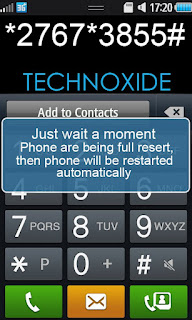
I am tested it with Samsung Wave 2 on Bada 1.2 and Bada 2.0 and its successfully reset to the default one. It may be work with other Bada OS phones.
* Before hard reset your phone must be charged to a minimum of 60%
Steps:
1. Backup your contacts
2. Remove SIM and Memmory Card
3. Now dial *2767*3855# and wait till the phone reboots.
Thats it ! Done ! Now your phone will be in default state !
Subscribe to:
Posts (Atom)