Showing posts with label an. Show all posts
Showing posts with label an. Show all posts
How to Identify Files that don’t have an Extension

When we download files from torrents or other sites, sometimes the downloaded file may not have any extension. So windows cant identify the file type. To open the file we should know the extension.
By Googling you will get many tools to identify the extension and file type. I am sharing a best tool that worked well for me. It is very small in size and very easy to use.
Download TrIDNet and XML Definition here
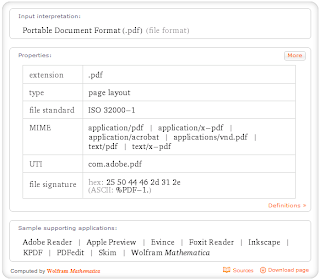
When you get the file extension if you want to know which software is required to preview that file.Just go to WolframAlpha Website and enter the extension with dot.for example if you want to know pdf enter .pdf ,now you will get something like below image.

Inky An Awesome Email app for Windows
Inky- An Awesome Email app for Windows:
Outlook is probably one of the most popular email client for Windows, but this is mostly used in enterprise as this is not a free app. It comes bundled with Office suite. Other free alternative is Thunderbird and there are quite a few others as well. Inky is a new desktop email client app which has an awesome interface and probably the best feature is that it supports almost all popular email services and you can add multiple accounts as well.
There are quite a few interesting aspects about this app, firstly for adding email account, you do not have to manually enter the ports and configurations, the app detects them automatically based on your email address. Inky works with any IMAP or POP account. Secondly Inky predicts how relevant each message is to you and shows you using a colored ink drop. Inky organizes your mail into smart views. Focus on mail from personal contacts, social sites, daily deal sites, and subscriptions separately.
Inky enhances each message with one or more useful tools such as a one-click unsubscribe button or a map of a street address. What makes Inky stand out is the super friendly user interface, clean and easy to use.
Inky supports all the popular email services like Gmail, Yahoo mail, Hotmail or Outlook.com etc. Inky keeps your emails intact and in sync with your email provider. For example, if you read a work email message, and then go to the office, you will see that message is marked as read there as well.

The app also helps you make sure you send your email from the right accounts to the right person. Inky will suggest people to add to an email if you frequently include them in a group.
Whether you have one account or multiple, Inky provides a new, refreshingly simple interface to check all your mail.
Inky is available for both Windows and Mac.
Download Inky
Outlook is probably one of the most popular email client for Windows, but this is mostly used in enterprise as this is not a free app. It comes bundled with Office suite. Other free alternative is Thunderbird and there are quite a few others as well. Inky is a new desktop email client app which has an awesome interface and probably the best feature is that it supports almost all popular email services and you can add multiple accounts as well.
There are quite a few interesting aspects about this app, firstly for adding email account, you do not have to manually enter the ports and configurations, the app detects them automatically based on your email address. Inky works with any IMAP or POP account. Secondly Inky predicts how relevant each message is to you and shows you using a colored ink drop. Inky organizes your mail into smart views. Focus on mail from personal contacts, social sites, daily deal sites, and subscriptions separately.

Inky supports all the popular email services like Gmail, Yahoo mail, Hotmail or Outlook.com etc. Inky keeps your emails intact and in sync with your email provider. For example, if you read a work email message, and then go to the office, you will see that message is marked as read there as well.
The app also helps you make sure you send your email from the right accounts to the right person. Inky will suggest people to add to an email if you frequently include them in a group.
Whether you have one account or multiple, Inky provides a new, refreshingly simple interface to check all your mail.
Inky is available for both Windows and Mac.
Download Inky
Find The Email An Attachment Was Saved From In Mac OS X Mail
A common problem with a bulky inbox is finding emails. Almost every email service and client has a search feature, with some offering very smart parameters for refining the search (like Gmail’s web interface) but still, at times quickly finding the right email can be a pain. Similarly, if you’ve downloaded an attachment that came with an email and are trying to trace it back to the original message, you could be out of luck if you have renamed the file in the meantime, and will likely need to go through several emails individually to find it since for the most part, you are relying on memory to remember who the email was from, or a snippet from the email’s subject. If you’re using the default Mail app on a Mac, though, finding the email that an attachment came with is much easier than you know, as every attachment that you download saves details of where the file originated from i.e. the email’s sender and subject. You can use this to find the original email thread.
Right-click an attachment and select the ‘Get Info’ option. Scroll down and expand the ‘More info’ tab. Here, you will see where this file came from. An email address followed by the subject indicates that file originated from the Mail program, and this information can be used to search for the email using Mail’s own search feature. This information is preserved even after you have edited the file after downloading it.

Should the search return too many results (or none at all) and you need to get to the email fast, the script that follows the email and subject in the file’s info box is bound to help. Just copy the text you see after the subject – in this case, the “message:%3CCA+f2sof-s3fHyvt_6woCCR0gAUJKs9RofyTA=VzHqNouJwjT6g@mail.gmail.com%3E” part (without the quotes). Next, paste it into Safari’s address bar (no other browser will work), and hit enter. Safari will automatically open the exact email for you.

This tip is useful so long as the email you’re looking for had a file attached and you saved it to your Mac HD. By saving an attachment, we don’t mean the default backup that Mail makes; you can’t browse the files in that folder because the backups that Mail makes are in MBOX format and can be opened with an email client only. You have to download the attachment in its original format and then access its information window. Although this limits the usability of this trick, it still makes the process of tracking down the email that a document came attached with, considerably easier than using Safari or Mail’s search feature for the purpose.
[via Mac OS X Hints]
Advertisement
Right-click an attachment and select the ‘Get Info’ option. Scroll down and expand the ‘More info’ tab. Here, you will see where this file came from. An email address followed by the subject indicates that file originated from the Mail program, and this information can be used to search for the email using Mail’s own search feature. This information is preserved even after you have edited the file after downloading it.
Should the search return too many results (or none at all) and you need to get to the email fast, the script that follows the email and subject in the file’s info box is bound to help. Just copy the text you see after the subject – in this case, the “message:%3CCA+f2sof-s3fHyvt_6woCCR0gAUJKs9RofyTA=VzHqNouJwjT6g@mail.gmail.com%3E” part (without the quotes). Next, paste it into Safari’s address bar (no other browser will work), and hit enter. Safari will automatically open the exact email for you.
This tip is useful so long as the email you’re looking for had a file attached and you saved it to your Mac HD. By saving an attachment, we don’t mean the default backup that Mail makes; you can’t browse the files in that folder because the backups that Mail makes are in MBOX format and can be opened with an email client only. You have to download the attachment in its original format and then access its information window. Although this limits the usability of this trick, it still makes the process of tracking down the email that a document came attached with, considerably easier than using Safari or Mail’s search feature for the purpose.
[via Mac OS X Hints]
Advertisement

Music DJ is an Excellent Music Player for Windows 8 RT
There are many third party free music players available for Windows which includes the popular Winamp, Real Player etc. But when it comes to Windows 8 tablets and desktops, the default music player does not have great features to make it stand. If you are using a Windows RT tablet, then you porbably have to depend on apps from Windows Store. Now if you are looking for a good music player for your Windows 8, you should be trying out Music DJ.
Music DJ is an easy-to-use music player for Windows 8 with super-fast search and enqueue of your entire music library. When you open the player, it searches for all the music in your music folder.

You can simply drag and drop files to create a playlist and then save it. The player allows you to shuffle music and also repeat the songs.

The player is optimized for use with both touch, mouse and keyboard. MusicDJ can also stream your music right to your Xbox, and integrates with Windows’s media buttons and media remotes, as well as support music playback in the background while you’re working on something else.
Another feature of Music DJ is that you can control the player from your Windows phone, which means you need to install an app on your Phone and control it (only Pro version).

What makes Music DJ good is the intuitive UI and also the ease with which you can use the player. Music DJ is worth downloading on your phone.
Download Music DJ
ReadMore detail...
Music DJ is an easy-to-use music player for Windows 8 with super-fast search and enqueue of your entire music library. When you open the player, it searches for all the music in your music folder.
You can simply drag and drop files to create a playlist and then save it. The player allows you to shuffle music and also repeat the songs.
The player is optimized for use with both touch, mouse and keyboard. MusicDJ can also stream your music right to your Xbox, and integrates with Windows’s media buttons and media remotes, as well as support music playback in the background while you’re working on something else.
Another feature of Music DJ is that you can control the player from your Windows phone, which means you need to install an app on your Phone and control it (only Pro version).
What makes Music DJ good is the intuitive UI and also the ease with which you can use the player. Music DJ is worth downloading on your phone.
Download Music DJ
Inky An Awesome Email app for Windows
Outlook is probably one of the most popular email client for Windows, but this is mostly used in enterprise as this is not a free app. It comes bundled with Office suite. Other free alternative is Thunderbird and there are quite a few others as well. Inky is a new desktop email client app which has an awesome interface and probably the best feature is that it supports almost all popular email services and you can add multiple accounts as well.
There are quite a few interesting aspects about this app, firstly for adding email account, you do not have to manually enter the ports and configurations, the app detects them automatically based on your email address. Inky works with any IMAP or POP account. Secondly Inky predicts how relevant each message is to you and shows you using a colored ink drop. Inky organizes your mail into smart views. Focus on mail from personal contacts, social sites, daily deal sites, and subscriptions separately.
Inky supports all the popular email services like Gmail, Yahoo mail, Hotmail or Outlook.com etc. Inky keeps your emails intact and in sync with your email provider. For example, if you read a work email message, and then go to the office, you will see that message is marked as read there as well.
The app also helps you make sure you send your email from the right accounts to the right person. Inky will suggest people to add to an email if you frequently include them in a group.
Whether you have one account or multiple, Inky provides a new, refreshingly simple interface to check all your mail.
Inky is available for both Windows and Mac.
Download Inky
Subscribe to:
Posts (Atom)